my NDIS app
Industry
Government
Client
NDIA
Role
Product Designer
Date
2021-2023
Two-year engagement within a large-scale government app supporting NDIS participants. Worked as part of a cross-functional delivery team alongside multiple designers, developers, and policy stakeholders.
SCOPE
My role at the National Disability Insurance Agency focused on iterative UX/UI refinements within the my NDIS app, contributing to usability testing and improving accessibility across financial and claims-related components. Alongside design contributions, I also worked as a Digital Producer, providing end-to-end visibility across requirements, backlog refinement, stakeholder alignment UAT/BVT testing, and delivery.
This dual perspective strengthened my ability to design within real technical and policy constraints, ensuring solutions were not only user-centred but practical, scalable, and implementation-ready.
CONSTRAINTS
The app serves a diverse user base, including participants with varying cognitive, visual, and motor accessibility needs. All work operated within strict WCAG compliance requirements and government policy constraints.
Design changes were incremental and component-based, ensuring scalability across the wider system. The focus areas below highlight selected examples of this work.
FOCUS AREA 1
PROBLEM
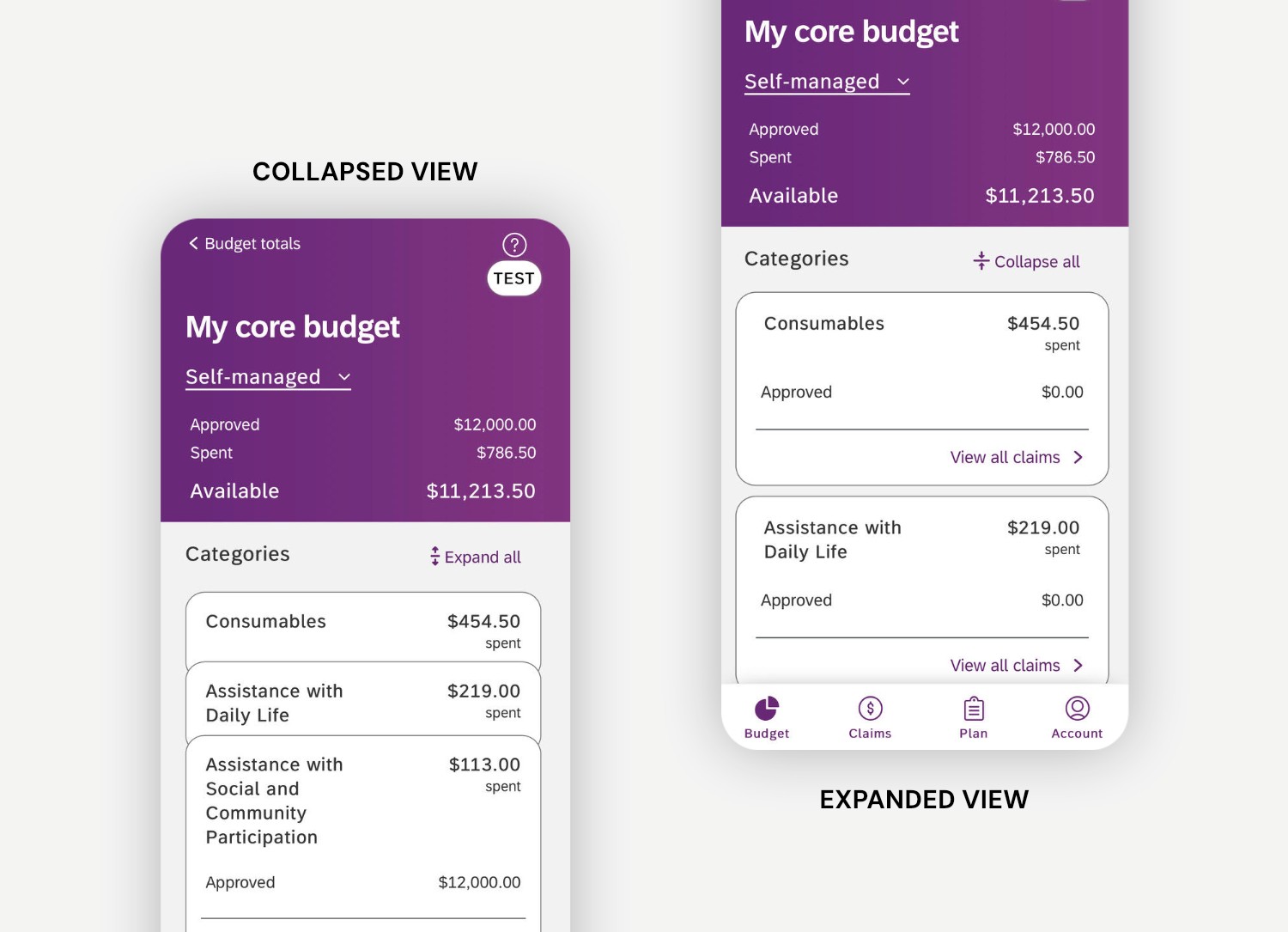
During usability sessions, participants expressed difficulty:
Understanding how much funding remained in each category
Interpreting the relationship between Approved, Spent, and Available amounts
Navigating expanded budget breakdowns efficiently
Many users relied heavily on the “Available” amount but struggled to visually prioritise it within the hierarchy.
DESIGN IMPROVEMENTS
Refinements focused on improving financial clarity through component hierarchy and accessible interaction states:
Increased prominence of “Available” amount using visual hierarchy and spacing
Clear separation between Approved, Spent, and Available values
Expand/Collapse controls with clear affordance and consistent placement
Improved touch targets for expandable categories
Consistent spacing to reduce cognitive overload
Percentage indicators paired with dollar values for faster scanning
ACCESSIBILITY CONSIDERATIONS
Ensured sufficient contrast ratios for financial values
Maintained predictable expand/collapse behaviour
Reduced visual noise in nested category structures
Preserved consistent component behaviour across all budget types
These updates improved scannability and reduced cognitive load when reviewing funding breakdowns.
FOCUS AREA 2
PROBLEM
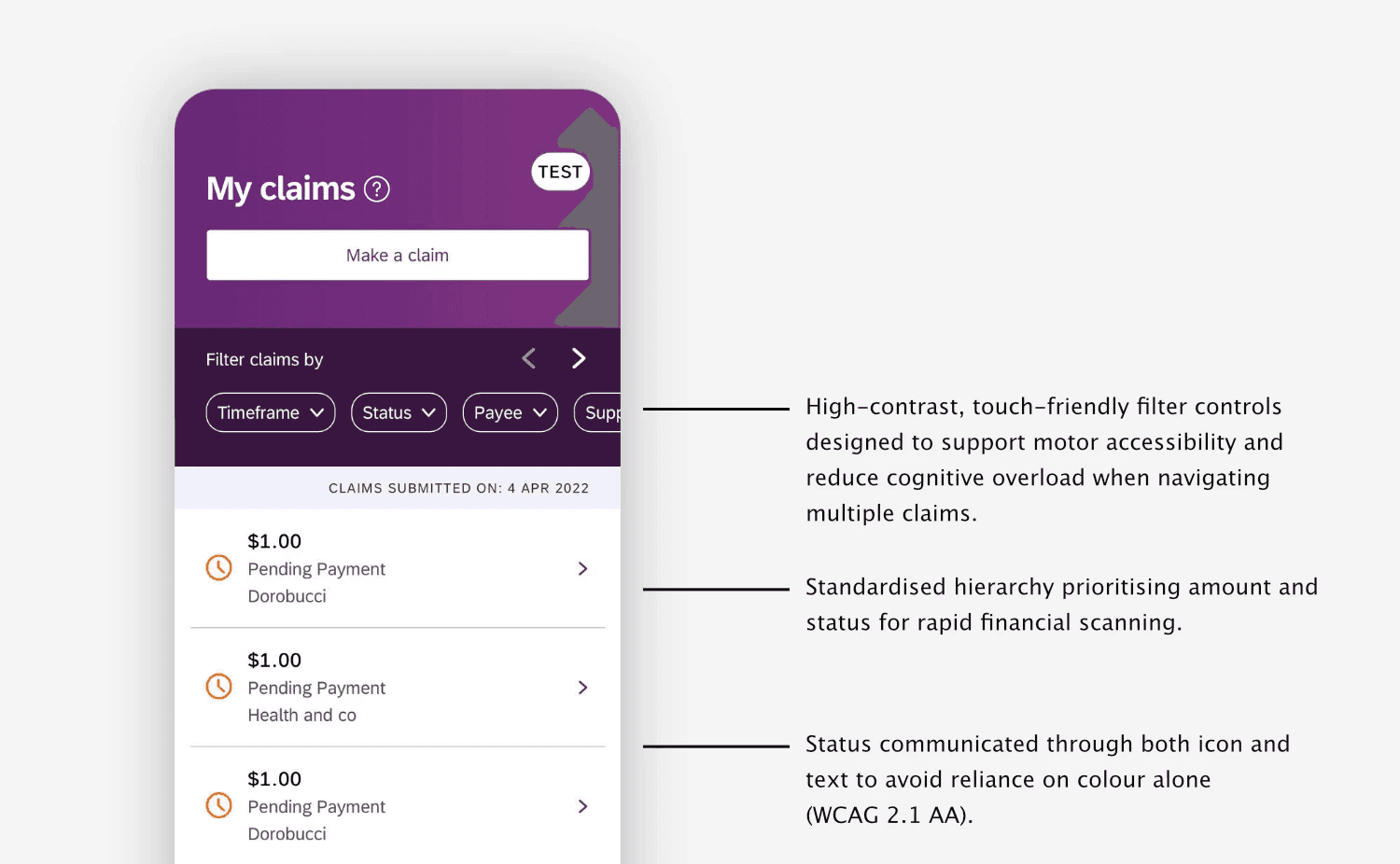
Participants managing multiple claims reported difficulty:
Understanding claim status at a glance
Distinguishing between processing and action-required states
Filtering large lists of historical claims
Status labels were often overlooked when scanning vertically.
DESIGN IMPROVEMENTS
Refinements focused on component consistency and clarity:
Paired icon + label status indicators for improved recognition
Standardised placement of claim amount and status across cards
Improved contrast and spacing for status visibility
Introduced clearly styled filter chips (Timeframe, Status, Payee)
Ensured active filter states were visually distinct
ACCESSIBILITY CONSIDERATIONS
Clear icon semantics to support quick recognition
Large tap areas for filter chips
Consistent alignment to reduce scanning effort
Avoided relying solely on colour to communicate status
These updates improved clarity for users managing multiple transactions.
FOCUS AREA 3
CONTEXT
The Edit Claim feature was introduced in response to repeated participant feedback requesting greater flexibility when managing existing claims. Previously, users were required to recreate or resubmit claims to correct minor errors, creating frustration and unnecessary duplication. Given the financial implications of claims, the new editing capability needed to balance flexibility with clarity and reassurance, ensuring users felt confident making updates without fear of unintended consequences.
PROBLEM
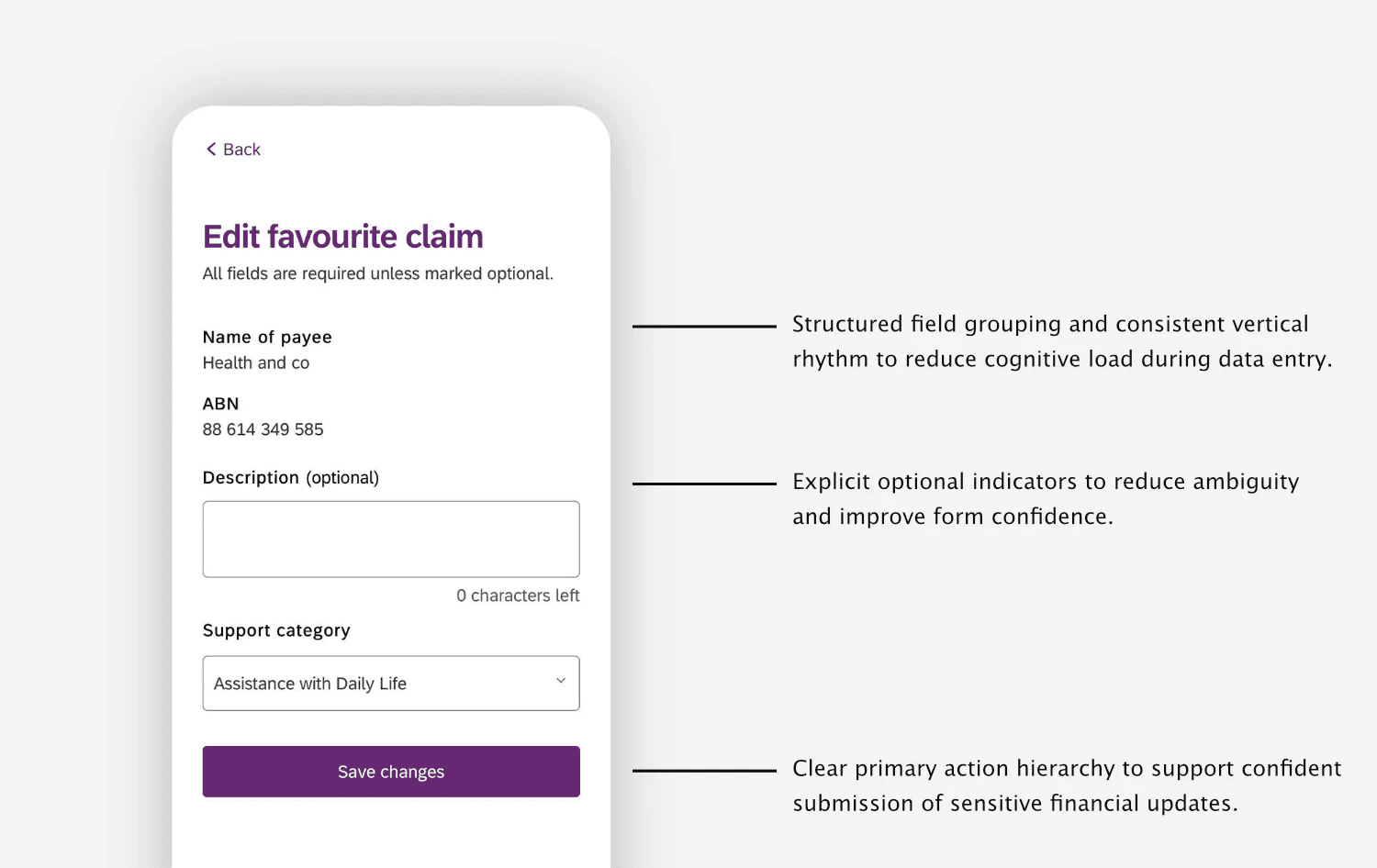
Participant feedback revealed friction around:
Understanding what could be edited versus fixed
Required vs optional fields
Dropdown discoverability
Character limits and input expectations
Confidence when saving changes
Participants were cautious when modifying financial information and required clear feedback before committing updates.
DESIGN IMPROVEMENTS
Refinements focused on improving clarity, hierarchy, and confidence within the editing flow:
Clear visual distinction between editable and non-editable fields
Improved field grouping and consistent vertical rhythm
Explicit “optional” indicators where relevant
Larger, more discoverable dropdown tap targets
Clear primary action styling for Save
Consistent placement of secondary actions such as Back and Delete
Improved spacing to reduce cognitive load during data entry
ACCESSIBILITY CONSIDERATIONS
High contrast form inputs and labels
Predictable input and focus states
Clear button hierarchy to avoid accidental actions
Reduced reliance on colour alone to communicate meaning
Structured layout to support assistive technologies
These updates improved participant confidence when modifying sensitive financial information while maintaining alignment with system-wide design standards.
COLLABORATION
Improvements were delivered within an established design system and governance framework.
I worked collaboratively with:
Other designers contributing across the wider app experience
Developers implementing component-level updates
Accessibility specialists ensuring WCAG compliance and inclusive design
Policy and stakeholder teams ensuring compliance alignment
Given the scale of the app, changes were iterative and component-based, designed to scale consistently across the broader claims experience.
OUTCOME
The improvements strengthened clarity and accessibility within key areas of the claims experience while remaining fully aligned with the existing design system and governance constraints of the NDIS platform.
Iterative component updates helped streamline several interaction patterns across the claims workflow, contributing to a ~20% increase in positive feedback within internal app feedback channels and public app store reviews.
The updates also supported fewer user-reported issues related to claim submission steps, helping reduce friction within a critical part of the participant journey.